Antigravity /swarm on Google AI Pro: Our First Runs, and Why Auto Mode Matters
Update (Nov 12, 2026): We ran the same task in the Antigravity desktop app 2.31.2. It finished in under a minute with no approval prompts, under the Turbo preset, and the app's Swarm pane has a Graph tab that replays the run. Details and a video: Antigravity 2.31 Brings /swarm to the Desktop App.
TL;DR: Antigravity's multi-agent /swarm mode reached our Google AI Pro account on the morning of November 11, 2026, in Antigravity CLI 1.5.5. Google's documentation says it is available on Pro and Ultra, in the app and the CLI, as a quota-heavy preview. We ran the same tiny task twice: the conversation became a coordinator, added an author, a verifier and a stall monitor, and finished in two to three minutes with passing tests. Under the Default permission preset, every file write and command a worker made waited for our approval. In Auto mode there was not a single prompt. If you try swarm, Auto mode is what makes it usable; and on a small task, one agent would probably be faster (we didn't time one).
What /swarm is
Google announced /swarm on November 10 together with Gemini 4 Carbon (Antigravity blog). It is the native multi-agent mode we had watched being built since CLI 1.3.4 (our earlier coverage). According to the documentation and the CLI 1.5.5 changelog:
/swarm <task>turns your current conversation into the coordinator. It names the swarm, splits the work into pieces that don't collide, and adds a named worker for each piece, such as@parseror@docs.- Each worker runs in its own conversation with a clean context. Its brief, saying what it owns, what it must not touch and what "done" means, is posted on a shared board that every member can read.
- The coordinator usually adds a
@verifierfor every two to four workers, which reads the diffs and runs the tests, and a@monitorthat speaks up only if the whole swarm stalls. - The coordinator doesn't do the technical work itself. It hands out tasks, judges the results and reports to you.
- Workers waiting for something sleep on the board without using tokens and wake up when someone mentions them.
- Workers use the conversation's model unless you ask for another one in the prompt. Any model from your
/modelpicker can be used. - A worker that runs out of quota pauses instead of retrying, and doesn't restart on its own when the quota refreshes.
In the CLI, /swarm board (or Alt+S) opens a full-screen board with a Roster of members and their models, a Posts feed and a Message pane. The app has a Swarm side pane with Board, Members and Graph tabs. The command is labeled "(Preview & Quota Heavy)" in the / menu, because every worker is a separate agent that uses your quota.
When it reached Google AI Pro
On the evening of November 10, right after updating to CLI 1.5.5, our Pro account still got Unknown command: /swarm, although the 1.5.5 changelog lists the command. The next morning, with no further update, the same 1.5.5 listed /swarm in the menu and accepted it. Apparently Google switched it on from its side, at least for our account. The documentation page, which we first saw the same morning, names Google AI Pro and Google AI Ultra as the plans that have it.
Our test: one tiny task, twice
We picked a task small enough to cost little quota and easy to verify, in an empty folder, with Gemini 3.8 Flash (Medium) as the conversation model:
/swarm Create hello.py with a function greet(name) that returns "Hello, <name>!", and test_hello.py with a pytest test for it. Run the test to verify.
Run 1: the Default permission preset
The coordinator named the swarm "Create and test hello.py" and added three members: @author to write both files, @verifier to run pytest and report back, and @monitor to watch for stalls. It wrote no code itself; it posted a brief to each member. All four ran on Gemini 3.8 Flash (Medium), since we hadn't asked for another model.
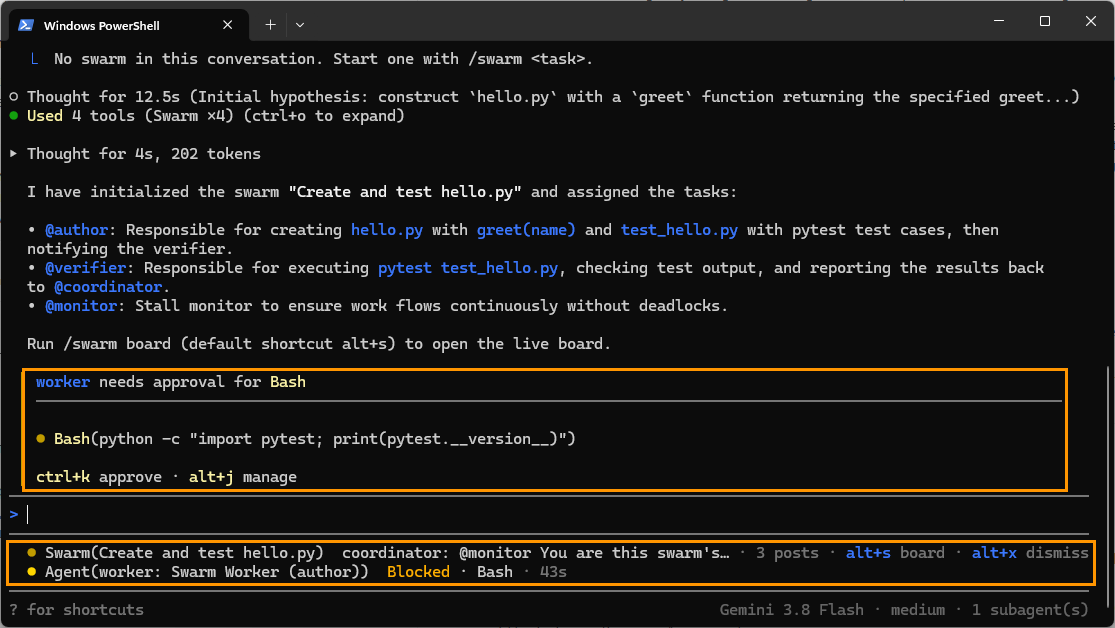
Then the waiting began. Every time a worker wanted to create a file or run a command, the main window showed "worker needs approval", and the worker's status row said Blocked until we pressed Ctrl+K:
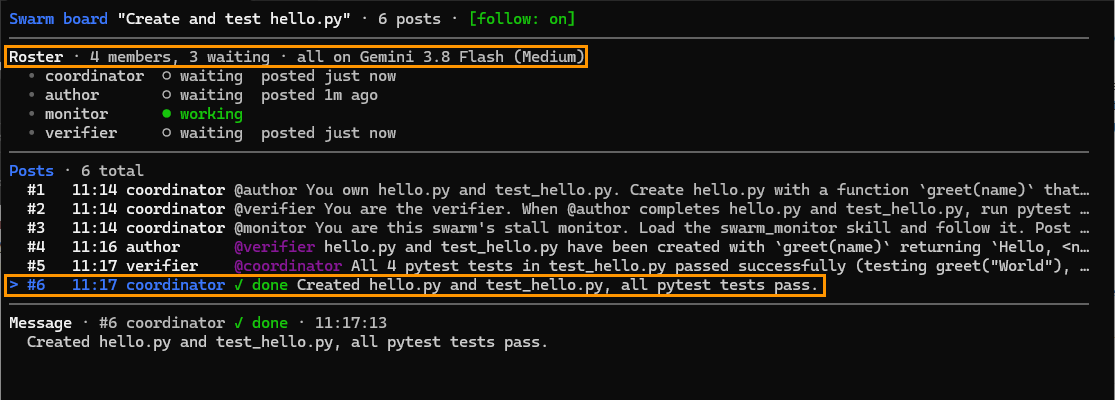
After we approved each step, the author created both files, the verifier ran pytest, and four tests passed. The swarm took about three minutes and six posts on the board:
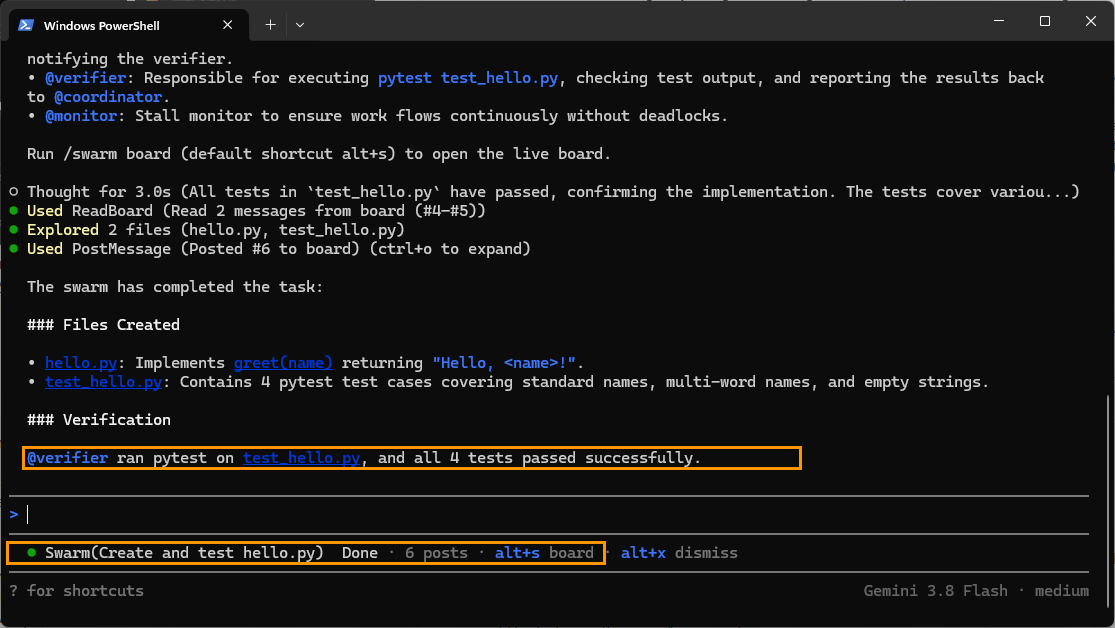
The coordinator then summarized the result in the main conversation, and the swarm's status row changed to Done:
With two working members on a two-file task, that meant several prompts (we didn't count them). A swarm with five workers on a real project would presumably ask far more often, and every unanswered prompt keeps a worker blocked.
Run 2: Auto mode
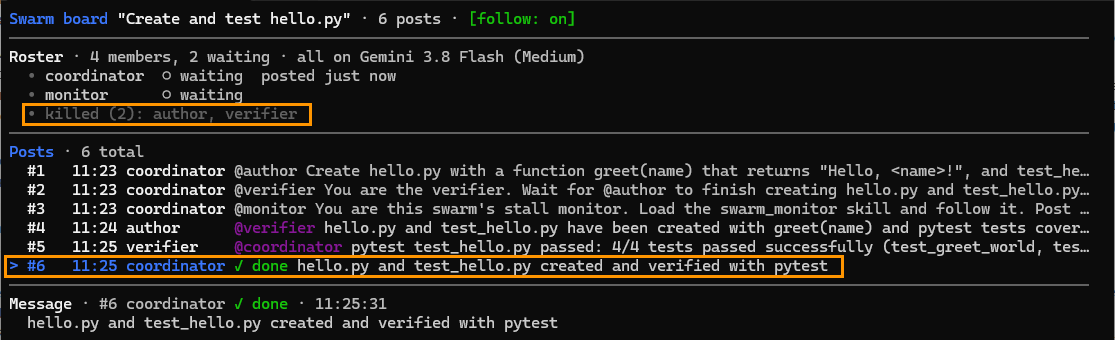
We deleted the files, switched the CLI to Auto mode (Shift+Tab cycles the permission modes; the status bar then shows "auto") and sent the same prompt. There was not a single approval prompt. The swarm had the same shape and finished in about two minutes, again with four passing tests.
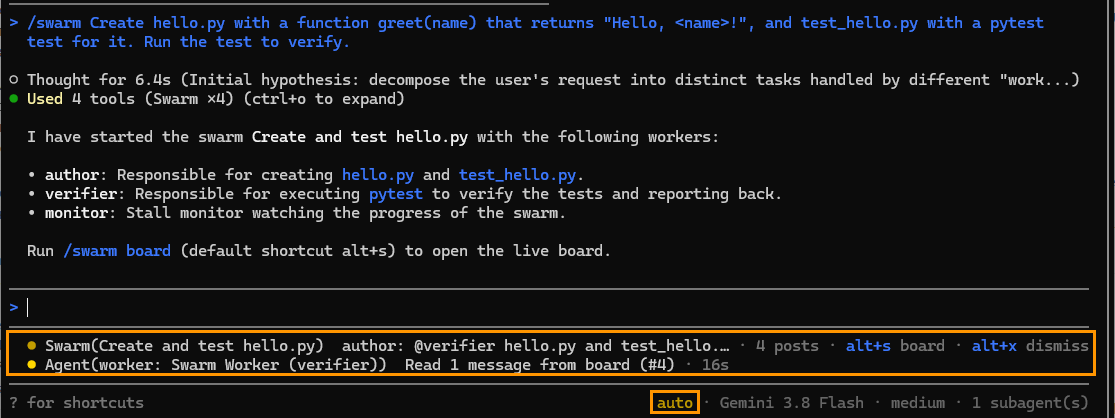
The CLI 1.5.4 changelog describes Auto mode as approving edits inside the workspace and running commands in the terminal sandbox, and asking only before commands that would leave the sandbox, unless its own review clears them. The permissions documentation says the same about commands outside the sandbox under the Auto preset. Creating two files and running pytest stayed inside those limits.
One difference between the runs: after posting "done", the coordinator in run 2 removed the author and the verifier, which the board lists as "killed". In run 1 they stayed on the board, waiting. The documentation says waiting workers use no tokens and that removing a worker is permanent, so either outcome is harmless here.
What this means for you
- Use Auto mode for swarms. Under Default, a swarm stalls on your approvals, which defeats the point of parallel workers. Auto mode keeps edits to the workspace and commands in the sandbox, so it is a middle ground. Turbo would also remove the prompts, but according to the permissions documentation it gives the agent read and write access over your full machine; we wouldn't use it for several agents at once.
- Give it a task that splits. On our task, a swarm needed two to three minutes: in run 1 the board shows the briefs at 11:14, the files at 11:16 and the tests at 11:17. One agent would probably have been faster, though we didn't time one. Google's own examples are tasks with several independent parts, such as changes across separate files or packages, or work you want reviewed and tested by a second agent.
- Watch your quota. Every worker is its own agent. Our two runs were too small to show up clearly, but Google labels the mode "Quota Heavy" for a reason. Since workers use the conversation's model by default, a swarm started from an Argon conversation runs all its workers on Argon unless you say otherwise in the prompt.
- Use git. According to the documentation, workers share your workspace by default, and when several of them edit at once, the coordinator can give each its own copy of the repository. (Google's blog post describes isolated git worktrees; the documentation makes that the coordinator's choice.) CLI 1.5.5 also fixed a bug where such copies lost your uncommitted changes. Commit before you start a swarm on real code.
What we don't know
- How swarm behaves on a real project with more workers, and how much quota that uses on Pro.
- How the verifier copes with a real disagreement, since in our runs the tests simply passed.
- Whether the app's Swarm pane behaves the same way; we tested only the CLI.
Read next
- Antigravity is building a native swarm mode: what the releases showed before launch
- Gemini 4 Carbon arrives in Antigravity, but only for Google AI Ultra
- Antigravity subagents on Google AI Pro: the "pro" tier isn't Gemini 4 Argon
Sources: our two swarm runs in Antigravity CLI 1.5.5 on a Google AI Pro account, November 11, 2026, in an empty test folder; the Antigravity swarm documentation, blog post and permissions documentation and the CLI changelog (agy changelog, versions 1.5.4 and 1.5.5), read November 10–11, 2026. The screenshots show the CLI as it was, with orange frames added; no account details are visible. How we work: editorial policy.