Antigravity CLI 1.5.7 Turns On Auto Mode by Default, Even for Headless agy -p
TL;DR: Antigravity CLI 1.5.7 (November 12, 2026) changes the default Agent Mode from Default to Auto. Per the changelog, this includes headless agy -p runs, wherever Auto mode is available. According to the CLI's own description, Auto approves file edits and safe commands and asks before irreversible actions. On our Google AI Pro account, a nested agy -p call ran in Auto without a prompt, while the same call under --mode accept-edits was auto-denied with a permission error. To turn Auto off, set Agent Mode to Default in /config.
What changed in Antigravity CLI 1.5.7
The 1.5.7 changelog entry says sessions with no saved mode, including headless -p runs, now start in Auto "wherever Auto mode is available and in Default elsewhere". Auto mode has been selectable for a while; what changed is that you no longer have to pick it. Per the 1.4.4 notes, on Windows it needs Windows 11 version 24H2 or later and a personal Google Account, so some machines stay on Default.
On our Pro account, the first launch after the update shows a banner that is not in the changelog:
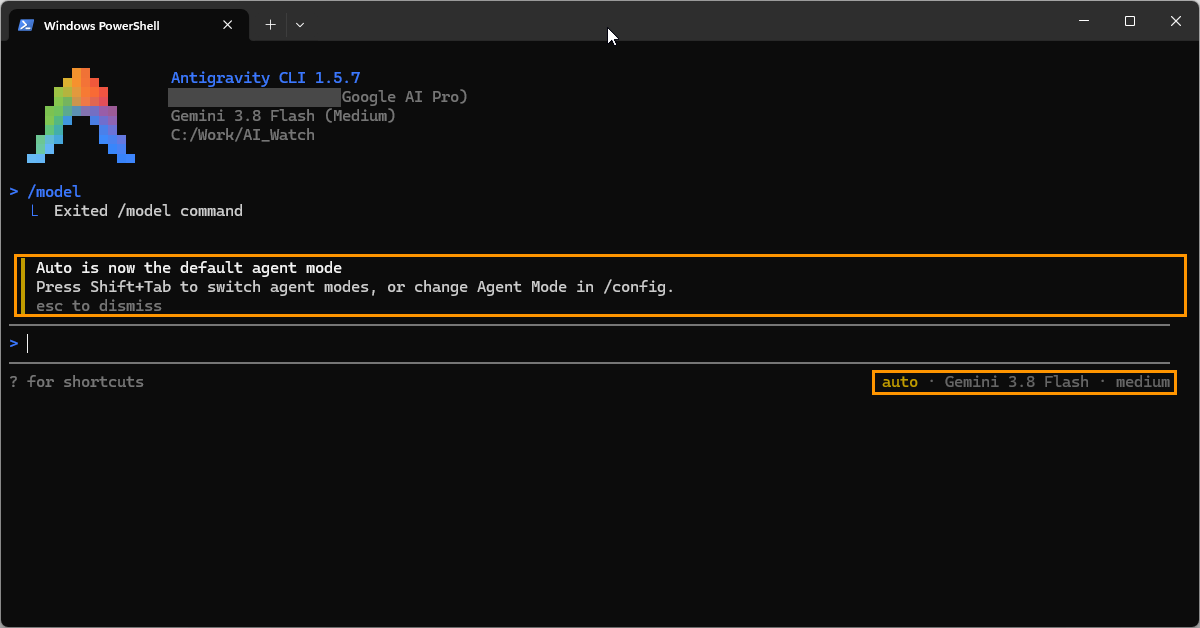
The banner reads:
Auto is now the default agent mode. Press Shift+Tab to switch agent modes, or change Agent Mode in /config.
The status line under the prompt reads auto · Gemini 3.8 Flash · medium. In /config, the hint under Agent Mode describes the modes:
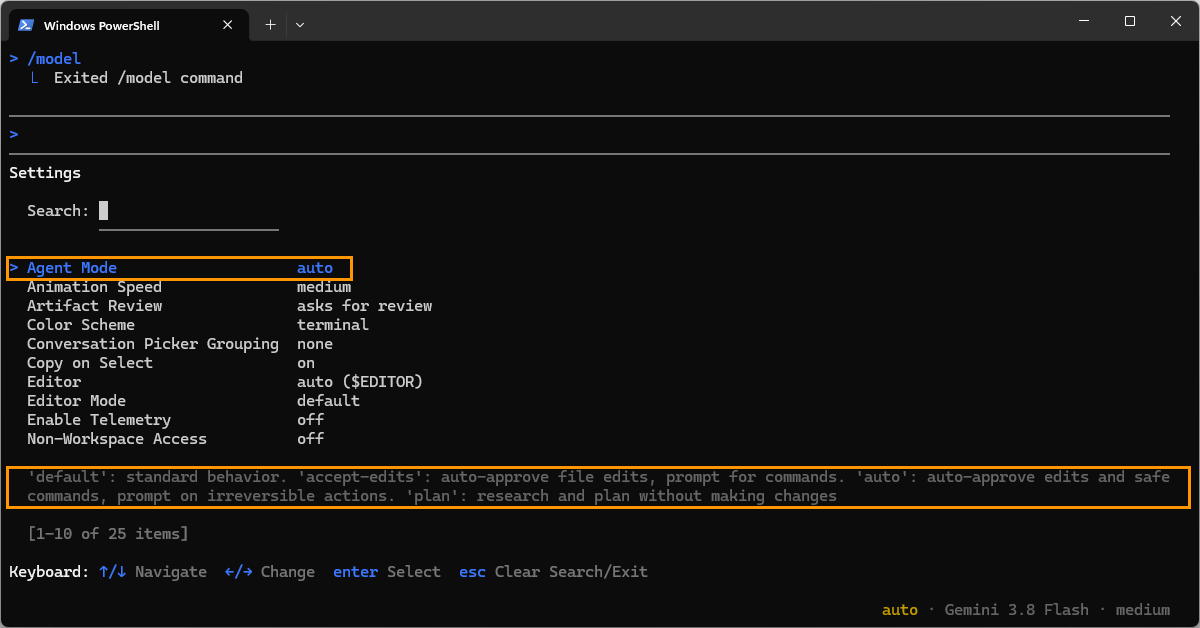
| Mode | What the CLI says it does |
|---|---|
default | standard behavior (in our /swarm test, Default stopped for every file write and command) |
accept-edits | auto-approve file edits, prompt for commands |
auto | auto-approve edits and safe commands, prompt on irreversible actions |
plan | research and plan without making changes |
The permissions documentation describes Auto the same way for commands outside the terminal sandbox. In the same swarm test, Auto finished with no prompts.
How to turn off Auto mode in Antigravity CLI
- For one session: press
Shift+Tabuntil the status line no longer showsauto. - Permanently: open
/configand setAgent ModetoDefault. This saves"agentMode": ""tosettings.json. - To keep file edits behind approval even in Auto: set
Tool Permissiontostrictin/config. As of 1.5.7,stricttakes precedence over Auto and accept-edits modes.
For a single scripted run, the CLI also accepts --mode with accept-edits, auto or plan (from agy --help). It has no default value, so for Default use the saved setting above.
What Auto mode allowed in headless agy -p: our test
The changelog says headless runs start in Auto. To see what that means in practice, on November 12, 2026 we ran agy -p in CLI 1.5.7 on a Google AI Pro account with Gemini 3.8 Flash, in an empty folder, with one harmless task per run:
Task given to agy -p | Mode | Result |
|---|---|---|
Create probe.txt containing one word | default (Auto) | File created, no permission prompt |
Run agy --version in the terminal | default (Auto) | Printed 1.5.7 |
Fetch the headers of https://example.com with curl -sI and print the first line | default (Auto) | Printed HTTP/1.1 200 OK |
Run a nested agy -p "Say hello in one short sentence" --model gemini-4-argon-low | default (Auto) | Reply: "Hello! How can I help you today?" |
| The same nested call | --mode accept-edits | Auto-denied: "a tool required the 'command' permission that headless mode cannot prompt for" |
The last two rows are the interesting ones. In our November 10 subagent test on CLI 1.5.4, a Flash agent running that nested call in headless mode was denied with a permission check error, even with allow rules for the command. In 1.5.7 the same call went through with no rule from us, and when we forced accept-edits, it was denied again, this time with a message that says to add a command(...) allow rule or use --dangerously-skip-permissions. That points to the mode as the difference, though we have not run the exact old setup again and we did not test a forced Default.
What this does not show:
- We didn't test 1.5.5 or 1.5.6, so we can't say which release changed the default. The 1.5.7 changelog names the change; nothing else in the notes mentions headless permissions.
- We see the answer, not the model that wrote it. The nested reply looks like Argon's output, but we haven't proven it came from the nested session.
- We don't know whether this Windows machine has an OS-level sandbox. The 1.5.7 notes say saved allow and deny rules now apply when an admin requires the sandbox on a machine without one, so behavior there differs.
- We tested harmless tasks only. We did not try destructive commands to see where Auto stops and asks.
Permission fixes in the same release
Two 1.5.7 fixes matter if your organization enforces admin review rules:
- A
PreToolUsehook returningauto_approve, or a wildcardcommand(*)allow rule, could bypass an organization's admin-enforced review. Per the changelog, commands that would leave the terminal sandbox, commands the admin policy holds for review, and file reads or writes outside the workspace under an "always ask" policy now always ask for your approval. - Saved command allow and deny rules were ignored when an admin policy required commands to run in the terminal sandbox on a machine with no OS sandbox. Your saved rules now apply, and commands not on the list still ask.
For people running scripts, another fix is relevant: the agent now notices when a command it moved to the background is waiting for input such as a password or a y/n prompt, instead of waiting silently. The release also fixes multi-second UI freezes on very long output lines, reply stalls of 20 seconds or more while tool-call groups animated, browser sign-in on Windows (the local callback now listens on IPv4 and IPv6), and a Gemini 4 Carbon error through enterprise model gateways.
How other tools handled the same switch
Anthropic announced that new Claude Code sessions on Pro, Max and Team plans start in auto mode from August 14, 2026, with pinned defaults unchanged. Antigravity CLI is making the same move about three months later. The Anthropic post does not say how headless claude -p runs are treated, so we don't compare that part. Whether an agent should ask less by default is a fair question either way; this article only records what the CLI does now.
What this means for you
- Interactive users where Auto is offered (we confirmed Google AI Pro; on Windows, personal accounts on 11 24H2 or later): the agent will now edit files and run commands it judges safe without asking. If you preferred the old prompts, switch with
Shift+Tabfor one session or setAgent ModetoDefaultin/config. - Scripts and CI that call
agy -p: this is the group to check. A run that used to stop at a denial may now proceed, and the permission error we saw underaccept-editsis what a locked-down mode looks like in headless runs. Pin the mode you want instead of relying on the default: pass--modeexplicitly, or set"agentMode"insettings.json(an empty string means Default). Try new scripts first in a throwaway folder. - Teams with admin policies: the 1.5.6 notes say Gemini Enterprise accounts keep following their organization's admin-controlled settings and are not offered Auto mode. Check your policy after updating, since the bypass fixes above ship in the same release.
- Anyone using hooks:
auto_approvefrom aPreToolUsehook no longer overrides an admin review for commands outside the sandbox or files outside the workspace.
What we don't know
- Which accounts and plans count as "where Auto mode is available". We tested a personal Google AI Pro account only.
- What exactly Auto treats as a "safe command" versus an irreversible action. The CLI gives the one-line description above, and we haven't mapped its boundary.
- Whether
agy -pbehaved differently before 1.5.7 for file edits. We have only the 1.5.4 denial for nested commands. - What a forced
Defaultdoes in headless mode. We testedaccept-editsonly, because--modehas nodefaultvalue.
Read next
- Antigravity /swarm on Google AI Pro: Default vs Auto mode in practice
- Antigravity subagents on Google AI Pro: the "pro" tier isn't Gemini 4 Argon
- Antigravity is building a native swarm mode
Sources: our tests in Antigravity CLI 1.5.7 on a Google AI Pro account, November 12, 2026 (agy changelog, agy --help, /config, first-launch banner, five agy -p runs); the CLI changelog for 1.4.4, 1.5.6 and 1.5.7; the permissions documentation; our subagent test of November 10, 2026 on CLI 1.5.4; Anthropic's post Auto mode is now the default in Claude Code. In the first screenshot we covered the account e-mail with a grey box; the orange frames are our marks. How we work: editorial policy.