Antigravity's Knowledge Work Layout: What Changes and Who Gets It
Update (Nov 10, 2026): Google narrowed who gets the layout a day after our first version. The changelog, settings and getting started pages now say it is for personal Google accounts only: business and Gemini Enterprise accounts always use Software Engineering and don't see Interface Layout in settings. Our original text said business accounts could switch; we corrected "Who gets the Knowledge Work layout" and the lines that depended on it.
TL;DR: On November 9, 2026, Google announced a Knowledge Work layout for the Antigravity desktop app, version 2.30.0. It hides developer controls such as Git, the terminal and code changes, while the agent, models and plugins stay the same. It is for personal Google accounts only: business and enterprise accounts always use the Software Engineering layout. You turn it on in Settings > General > Interface Layout. Existing users stay on the developer layout unless they switch, and new users get a starting layout based on the role they pick at first sign-in. The groundwork was visible in the app for almost two months before the launch, partly under the working name "Project 4K".
What Google announced
The blog post gives the reason: people use Antigravity for research, data analysis, documents, presentations and design prototypes, not only for code. Google says "tens of thousands of Googlers" outside engineering use it every week. Instead of a separate, lighter product, the app now has two interface layouts:
- Software Engineering: the interface you know, with code repositories, terminals and line-by-line code changes. It stays the default for existing users.
- Knowledge Work: the same agent, with the developer controls hidden.
According to the settings documentation, both layouts run the same agent and support the same models, permission presets, skills, rules, MCP servers (connections to outside tools) and plugins. Switching changes only which controls you see. The post does not mention prices or plan limits.
Who gets the Knowledge Work layout
- Personal Google accounts on app 2.30.0 or later. Business and Gemini Enterprise accounts always use the Software Engineering layout and don't see Interface Layout in settings (settings). The documentation doesn't tie the layout to a paid plan.
- Existing users keep the Software Engineering layout until they switch.
- New users get a starting layout based on the role they pick (see the table below).
New versions of the app "roll out gradually and may take a few days to reach all users", says the changelog. If you don't see Interface Layout under Settings > General, 2.30.0 probably hasn't reached you yet.
How to switch to the Knowledge Work layout
- Make sure the Antigravity app is on 2.30.0 or later.
- Open Settings (Cmd+, on macOS, Ctrl+, on Windows and Linux).
- Go to General > Interface Layout and choose Knowledge Work or Software Engineering.
The switch takes effect at once in open and new conversations, without a restart. You can switch back the same way.
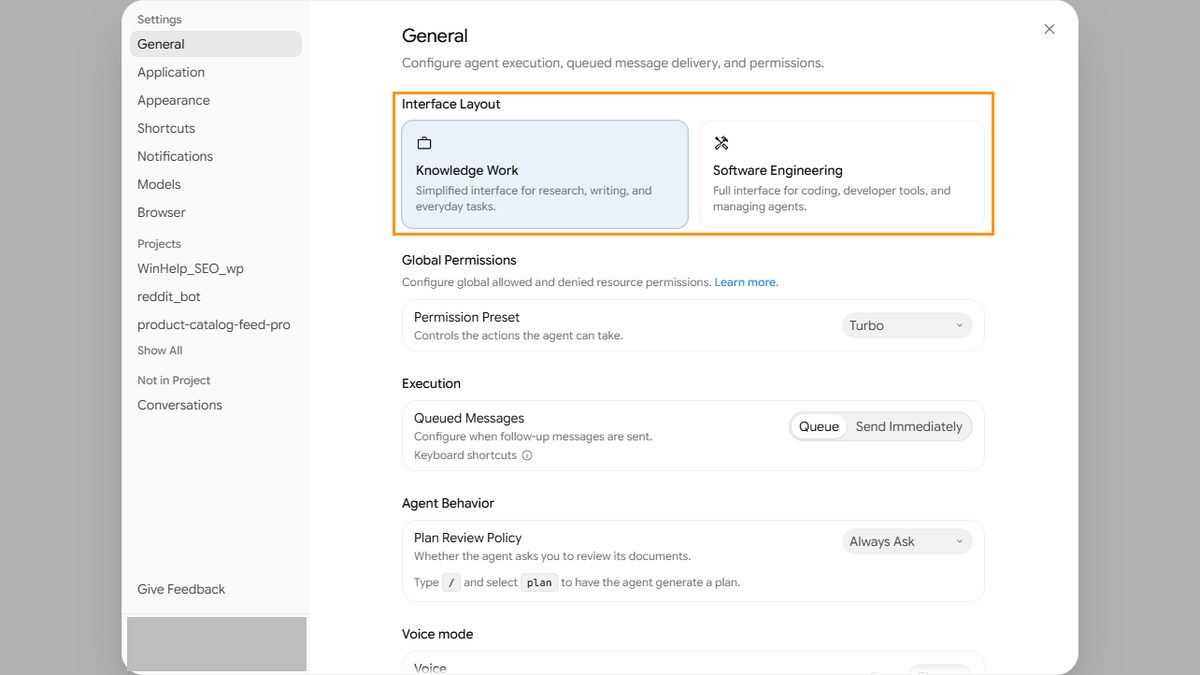
The two options describe themselves in the app: Knowledge Work is a "simplified interface for research, writing, and everyday tasks", Software Engineering a "full interface for coding, developer tools, and managing agents".
What changes in the Knowledge Work layout
From the blog post and the updated documentation pages (settings, projects, side panel):
- Projects without Git. New conversations run directly in the project's folders. The app no longer asks whether to work in a separate copy of a code project (a Git worktree), and it hides the branch picker, GitHub controls and the button that opens work in the IDE. Forking a conversation keeps it in the same folder. You can also start a conversation with no project.
- A quieter conversation. Expandable groups of tool calls, inline code changes with +/- line counts and subagent cards give way to a single live progress line. It disappears when the turn ends, leaving the reply and its outputs.
- Plain-language approvals. Permission prompts show a short summary in plain language instead of editors for command rules.
- A side panel built around outputs. The Overview panel stays hidden until the conversation produces something. It drops the Review and Terminal rows, renames the Files tree to Folders, and focuses on Documents, Artifacts, Links, Uploads and Background Tasks. Extensions stay when UI plugins or MCP Apps are active.
- Simpler settings. The Installed tab of Customizations lists only plugins. Skills, rules, custom agents and MCP servers you already set up keep working in the background. Detailed permission rules and the developer sections (Terminal, Workspaces, Labs) move behind Advanced Settings.
When we switched our own app (2.30.0 on Windows) to Knowledge Work, two of these changes were easy to spot: the Open in IDE button disappeared from the top right corner, and Global Permissions in Settings > General now shows only the Permission Preset; the detailed allow and deny rules are no longer on that page.
The documentation says nothing about quotas, and nothing suggests they differ between the layouts.
The role picker at first sign-in
The getting started guide describes the new onboarding for personal Google accounts in 2.30.0. After you sign in, the app asks what best describes your work. Each answer sets a starting layout:
| Your answer | Starting layout |
|---|---|
| Software Engineering | Software Engineering |
| Data & Analytics | Software Engineering |
| Knowledge Work | Knowledge Work |
| Science | Knowledge Work |
| Design | Knowledge Work |
| Other | Knowledge Work |
| Skip | Software Engineering |
The role also brings up to three starter prompts above the message box on the Home page. The blog post says the role tailors "recommended plugins"; the guide clarifies that picking a role installs nothing. When you click a starter prompt, the app installs the matching Marketplace plugin if needed, fills in the prompt and lets you edit it before sending. Prompts that use Google Calendar, Drive, Slides or Figma ask you to sign in to that service first. The Software Engineering role adds one more prompt, which imports MCP servers, skills, rules and instructions from Claude Code, Codex, Cursor and Gemini CLI.
Two months in the making
Knowledge Work did not appear overnight. Our version tracker compares each official Antigravity release with the previous one, and the layout took shape over several app versions:
- 2.15.0 (mid-September 2026): a setting for how technical the interface should be appears, with a simplified option that leaves out developer tools.
- 2.21.0 (early October): the setting moves to its own settings tab named Project 4K, offered as an alternative to the default experience. The same settings text ships with the CLI from 1.3.4 (October 13).
- 2.23.0 (October 12): onboarding starts asking what describes you best. The changelog for 2.23.0 also notes that onboarding now shows what Antigravity can do before you accept the terms.
- 2.29.0 (November 3): Project 4K is described as the interface without developer tooling.
- 2.30.0 (November 9): the Project 4K tab is gone. The choice now sits under Interface Layout in General settings, and the onboarding question asks about your work.
So "Project 4K" looks like the working name of what launched as Knowledge Work. That is our reading of the renamed setting, not something Google has said. We also don't know whether anyone outside Google could use it before 2.30.0: the setting was in the releases, but Antigravity turns many features on from Google's side, as with the Voice mode rollout in 2.29.
What this means for you
- If you write code: nothing changes unless you choose it. Existing users stay on Software Engineering.
- If you set Antigravity up for colleagues who don't code: this works only with personal Google accounts; work accounts (business, Gemini Enterprise) stay on Software Engineering. On personal accounts, Knowledge Work removes most of what confuses newcomers, such as worktree prompts, terminals and code changes, while keeping the same agent, plugins and connected services. Watch which role they pick at first sign-in: Data & Analytics opens in the Software Engineering layout.
- If you were waiting for a separate Antigravity for non-developers: for now, this is it, a layout inside the same app. Google doesn't mention a separate price or plan for it.
What we don't know
- How fast 2.30.0 reaches everyone. The changelog now lists 2.30.0, and new versions can take a few days to reach all users.
- Whether Knowledge Work will get features of its own. The blog post calls the layout "just the beginning" and promises more updates.
- Whether the layout matters outside the desktop app. The announcement and documentation mention only the app. The Interface Layout setting also appears in the settings text of CLI 1.5.3, but we haven't seen it change anything in the terminal.
We will update this article if the layout or its availability changes.
Read next
Sources: Google Antigravity for Knowledge Work (Antigravity blog, November 9, 2026); settings, getting started, projects, side panel and changelog documentation, read November 9–10, 2026; our own Antigravity app 2.30.0 on Windows; our version tracker's comparison of the official Antigravity app releases 2.15.0–2.30.0 and CLI releases from 1.3.4. How we work: editorial policy.