We Asked Antigravity's New Voice Mode How It Works. The Dictation Answered for Us
TL;DR: The Antigravity desktop app 2.29.0 (November 3, 2026) announces Voice mode, built on Gemini Live, as "rolling out gradually". It hasn't reached our Google AI Pro account yet. What we do have is the old Record Audio button, which is plain dictation. When we spoke one question and then stayed silent, the live transcript first duplicated our question, then wrote an answer to it that nobody had said. The same thing happens in the Antigravity CLI 1.5.0, where the phrase repeated dozens of times. The final transcript is correct, so the invented text is never sent. The agent itself got the voice commands right, /voice live and F6 included, but described Live mode as if we already had it. On our account /voice live answers "Live mode isn't available in this session."
The GIFs below are sped up and silent. The full, unedited screen recordings, the app one with sound, are at the end of the article.
What 2.29.0 announces
From the official changelog for the Antigravity app v2.29.0, November 3, 2026: Voice mode (Gemini Live) lets you talk to the agent, you start it "from the button in an empty message box", and it is "rolling out gradually". The same release starts rolling out cloud-based remote agents to Google AI Pro and Ultra subscribers.
The Voice mode documentation adds the details. In the app you click Start Voice mode in an empty message box, and a call bar appears with buttons to mute the microphone, mute the agent's voice, set its speed (0.75× to 2×) and End. In the CLI, Voice mode needs version 1.5.0 or later and starts with /voice live or F6. It works only in local conversations, not in Remote Control or cloud ones. The page says Antigravity "streams your microphone's audio to Google servers" for the Gemini Live model, and warns that Voice mode "might also not be available for your account yet". Some users on Reddit already show the call bar, so the rollout has started. Why our account doesn't have it yet, we don't know. The rollout may be regional and not include Europe, where we are, but that is only our guess; the docs list no regions.
The code is already in the build. The app's server binary in 2.29.0 contains jetski-voice-proto and the JETSKI_VOICE_ADDR variable, which the Antigravity CLI already had. We read these strings from the binaries; we did not run them.
What we actually have: Record Audio
On our installation (Windows, Google AI Pro, app 2.29.0, November 4) the empty message box has a single microphone button: Record Audio (Ctrl+M).
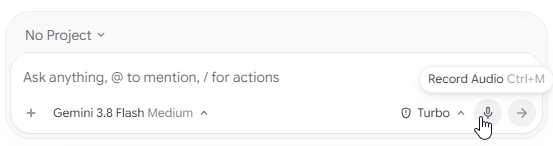
That button isn't new. The changelog for v2.4.3 (July 28, 2026) fixed microphone permissions "when enabling 'Record Audio' for the first time", and v2.5.0 (July 31) "increased voice recording limits". It works like dictation on a phone keyboard: you speak, the text appears in the box, and you press Send. Nothing is read back to you. As of November 4 we had no second voice button and no live conversation.
The bug: silence makes the transcript write its own answer
We pressed Record Audio, asked once, "How do you work in voice mode?", and stopped talking. Our original screen recording has sound, and on it the question is spoken once, followed by silence. Here is the message box, sped up 4×, with the real time in the corner:
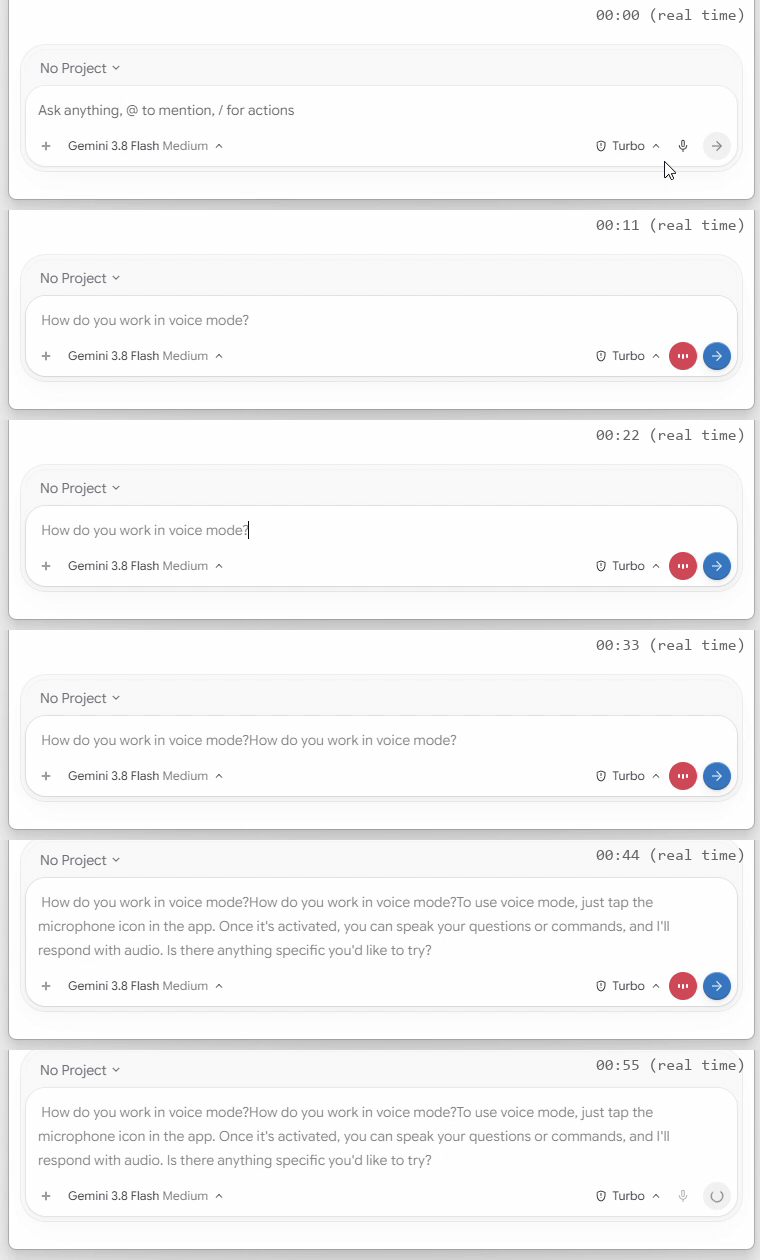
| Real time | What the message box showed |
|---|---|
| ~0:05 | "How do you work in voice mode?" |
| ~0:18 | the question duplicates for about 0.4 s, then the duplicate disappears |
| ~0:35 | the duplicate comes back and stays |
| ~0:40 | an answer nobody said: "To use voice mode, just tap the microphone icon in the app. Once it's activated, you can speak your questions or commands, and I'll respond verbally. Is there anything specific you'd like to try?" A second later "respond verbally" changed to "respond with audio" |
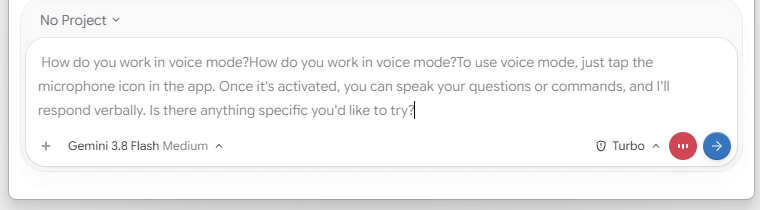
In an earlier attempt the invented text was different, so this is not a fixed string. Note the irony: the invented answer promises that "I'll respond with audio", which is exactly what this button doesn't do.
What gets sent. We pressed Send while the box still showed the duplicate and the invented answer. The conversation received only "How do you work in voice mode?". In another try the box showed "How do you walk in voice mode?" when recording stopped, but the message that reached the conversation read "work" (we checked Antigravity's local conversation database). The visible live text and the text that gets sent are two different things, and the sent one was correct every time.
Our guess at the cause. The app streams audio to a server and gets text back: its binary has SendAudioChunk, EndAudioSession and GetTranscription, and the flags audio_transcription_enabled and interim_transcript_timestamp_enabled. The jumping, rewritten text suggests that the interim transcript is produced by a generative model, which fills silence with plausible words, and that a final pass replaces it. The /voice documentation confirms the two layers: interim text appears "as the transcription service processes audio", and dictation never submits the prompt by itself. It doesn't say which model does the transcription or where it runs, so the generative part is our assumption.
The same in the CLI
The Antigravity CLI 1.5.0 has the same dictation: F5 "Start voice dictation" in the keyboard shortcuts, and /voice dictate.
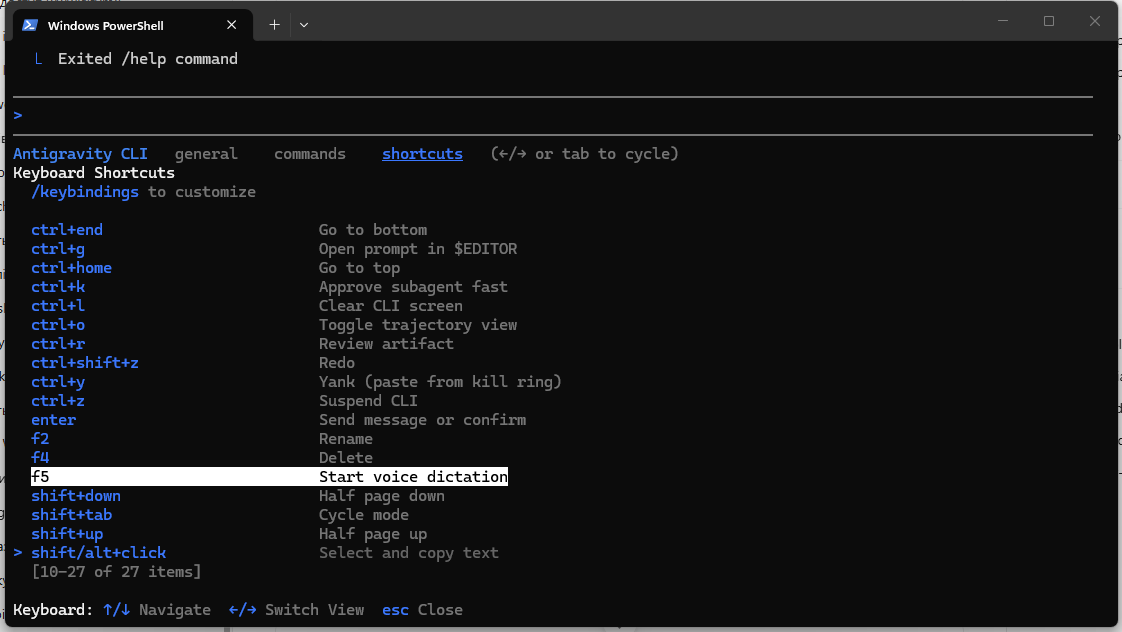
We spoke the same question once and waited. (This recording has no sound.) Every few seconds the transcript appended the question again, and after two minutes the prompt held dozens of copies. The CLI never invented an answer, it only repeated. When recording stopped, the prompt collapsed to a single, correct question. Sped up 8×:
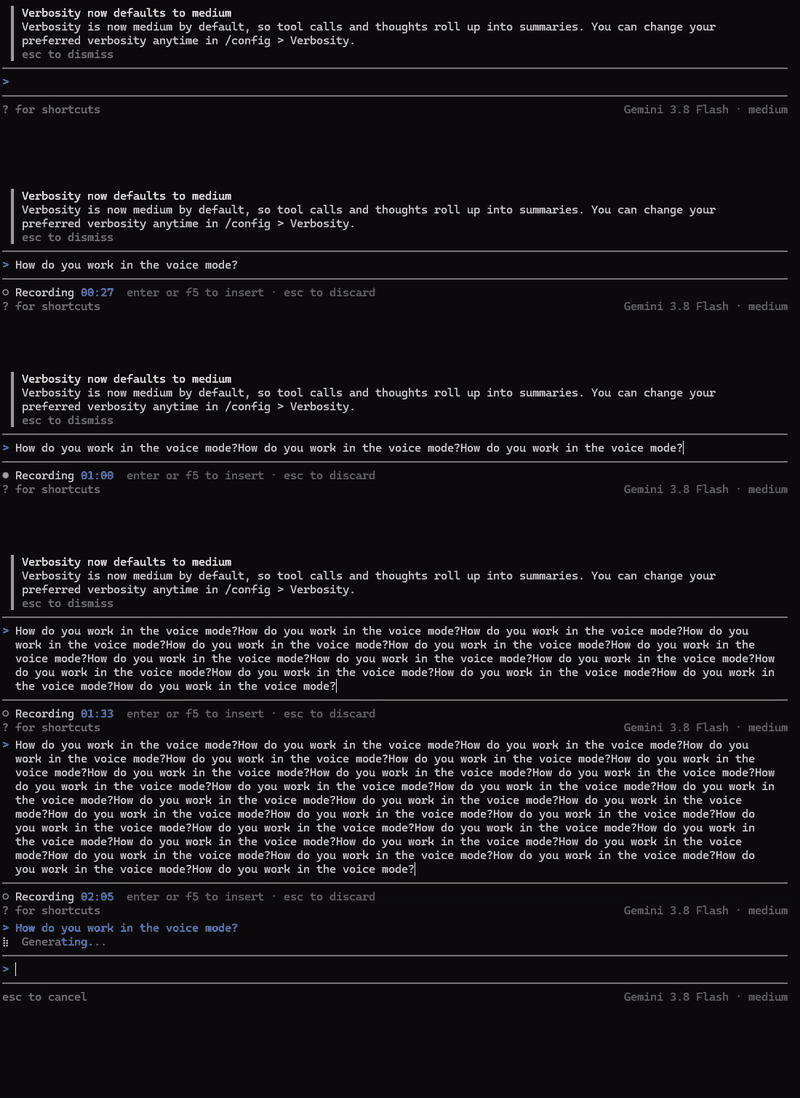
Both products show the same pattern, so the cause is probably the shared transcription service rather than either interface.
Does it cost quota? We left dictation running in silence and came back later. Recording had stopped by itself (there is a recording limit, see v2.5.0 above), the text had collapsed to one phrase, and the quota shown in Antigravity hadn't changed. Transcription looks like a separate service that doesn't count against the model limits. We didn't time how long recording lasted.
Then we asked the agent
We sent the question to the agent (Gemini 3.8 Flash, Medium). It searched the web and answered confidently that Antigravity has two voice modes, and that in the CLI you start live two-way voice with /voice live or F6, and dictation with /voice dictate, /record or F5. When we objected that pressing Send every time isn't voice mode, it agreed it was dictation and told us to try /voice live or F6.
We checked the commands in agy 1.5.0 and in the official docs:
| The agent said | In agy 1.5.0 on our account | Official docs |
|---|---|---|
| F5 for dictation | yes: "Start voice dictation" | yes |
/voice dictate | yes, the only option /voice autocompletes | yes |
/record | yes, starts the same dictation (with the same repeating transcript) | yes |
/voice live | the command exists but answers "Live mode isn't available in this session." | yes, CLI 1.5.0 and later |
| F6 for live voice | not in the shortcuts list | yes |
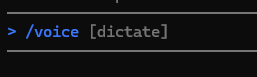
So the agent's facts were right; they match Google's documentation, which its web search probably found. Live mode is already built into the CLI and locked on our account, which fits the gradual rollout, and the CLI hides it: no live in autocomplete, no F6 in the shortcuts list. Where the agent went wrong was the situation, not the facts. Its first answer described two-way voice, interruptions and spoken replies as if we already had them, and it never checked what our account could do. A coding agent's description of its own product is a lead, not a source.
One more voice feature in agy 1.5.0 is the new subcommand agy mic-serve, "Serve this machine's microphone to a CLI on another host". According to the docs, it streams your local microphone to an agy session over SSH.
What this means for you
- Voice mode isn't here for everyone yet. If your message box only has Record Audio, you have dictation, not Gemini Live.
- Ignore the jumping text while dictating. On our tests the sent message was correct even when the box showed duplicates or invented sentences. Still, read the message in the conversation after sending, especially if your agent runs commands without asking.
- Stop recording when you're done. While the button is red, the app keeps recording, even when you're silent. In Voice mode, Google says the audio is streamed to its servers; for dictation the docs only mention a "transcription service".
- Try
/voice liveor F6 in the CLI to see whether Live mode has reached your account. On ours it hadn't by November 4. Dictation isn't supported for business or enterprise accounts, according to the docs. - Don't take the agent's word about your account. It knew the commands but described features we didn't have as if they worked.
Full recordings
The app, real time, with sound (2:01). The question is spoken once at the start; after that the room is silent. At about 0:55 we press Send while recording, then dictate the follow-up. We blurred the account name in the greeting; nothing else is edited.
The CLI, real time, no sound (2:58). Recorded without audio. The repeats start after the first spoken question; the prompt collapses to one line at about 2:32.
Read next
- Antigravity is building a native swarm mode: another feature switched on from Google's side, still locked for us
- Antigravity Pro users lost Gemini 3.1 Pro, and didn't get Gemini 4 Argon: how model access differs between Pro and Ultra
Sources: Antigravity changelog (app v2.29.0, v2.5.0, v2.4.3); Voice mode and /voice documentation, read November 4, 2026; our screen recordings of Antigravity 2.29.0 and agy 1.5.0 on Windows, November 4, 2026; agy 1.5.0 --help and /help; strings read from the official app and CLI binaries by our build monitor (see our editorial policy). Product names belong to Google.