Antigravity CLI 1.5.9–1.5.12: Split View, Dynamic Workflows, Faster Auto Mode and Gemini 4 Neon API Keys
TL;DR: Between November 14 and November 18, 2026, Google shipped four Antigravity CLI releases (1.5.9 through 1.5.12). Version 1.5.12 adds split view in Remote Control, Gemini 4 Neon for GEMINI_API_KEY sign-ins, near-instant /fork for large artifact folders, and faster Auto mode sandbox reviews on Gemini 4 Hydrogen, following Dynamic Workflows (run_workflow) in 1.5.9 and tighter sandbox defaults in 1.5.10.
What's new in Antigravity CLI 1.5.12?
Antigravity CLI 1.5.12 (November 2026) adds split view to the Remote Control browser view, unlocks Gemini 4 Neon for GEMINI_API_KEY sign-ins, makes /fork near-instant for large artifact folders, and speeds up Auto mode's sandbox-exit reviews on Gemini 4 Hydrogen by switching from high to medium thinking.
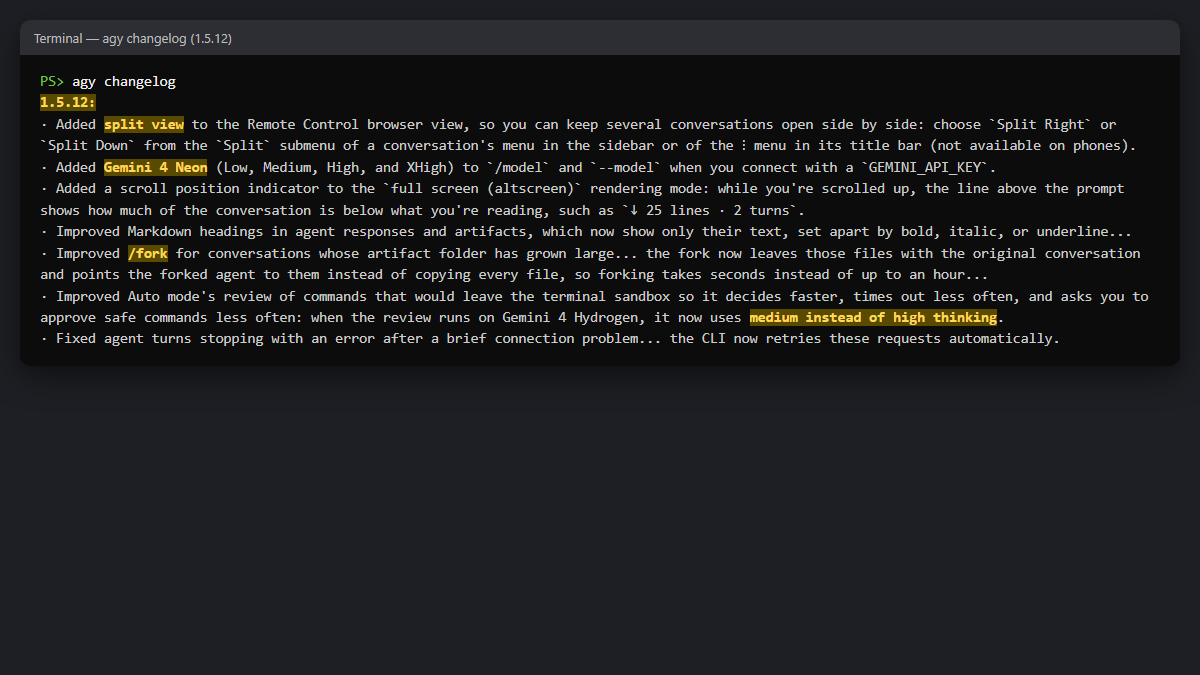
Across the last four releases (1.5.9 to 1.5.12), the updates split cleanly between Google AI Pro/Ultra subscribers (Dynamic Workflows, Orchestrator improvements) and GEMINI_API_KEY users (Gemini 4 Neon access and cleaner command menus):
| Version | Release date | Headline changes |
|---|---|---|
| 1.5.12 | Nov 18, 2026 | Remote Control split view, Gemini 4 Neon for GEMINI_API_KEY, faster Auto mode review (medium), instant /fork, sleep/disconnect retries |
| 1.5.11 | Nov 18, 2026 | Drag-to-mention subagent tabs, native Vim u undo, agy plugin validate for .zip and GitHub URLs, 20 MB Remote Control uploads |
| 1.5.10 | Nov 17, 2026 | ~/.config and AppData\Roaming sandbox block, single Orchestrator row in /model, Remote Control navigator & Quote, longer retries on rate limits (up to 4 min) |
| 1.5.9 | Nov 14, 2026 | run_workflow Python subagent orchestration, .mp4 /browser recordings, HTTP MCP redirect header fix |
Dates reflect the official CLI release dates; our local updater picked up 1.5.12 early on November 19 UTC.
Remote Control: split view, drag-to-mention and prompt navigator
Remote Control received the largest share of UI upgrades across 1.5.10–1.5.12:
- Split view (1.5.12): On desktop and tablet screens (not phones), you can keep multiple conversations open side by side via Split Right or Split Down in a conversation's sidebar menu or title bar
⋮menu. - Drag-to-mention subagents (1.5.11): Dragging a subagent's tab from the side panel into the message box inserts an
@mention of that subagent's conversation. - Navigation and quoting (1.5.10–1.5.11):
- A prompt-navigator rail previews your prompts on hover and jumps on click (
[and]also jump between prompts). - Selecting text in an agent response shows a Quote button; clicking an older quote in 1.5.11 loads earlier history and scrolls to it.
- Web links in messages open with
Ctrl+click/Cmd+click. - Active timers display live countdowns (such as
59m left) in Background Tasks and the status line. - Uploads and reliability (1.5.11–1.5.12): File and artifact tabs open with their sidebar collapsed by default; attachments up to 20 MB upload;
Enterwaits while an attachment finishes uploading instead of dropping your message; and 1.5.12 fixes a crash on conversations with@mentions pasted from a Markdown export (such as Google Docs' Copy as Markdown).
Dynamic Workflows: Python subagent orchestration with run_workflow
Version 1.5.9 rolled out run_workflow to all Google AI Pro and Google AI Ultra users across both the CLI and the Antigravity app.
Instead of running one monolithic turn, the agent can write and execute Python orchestration scripts (using Python bundled with the CLI, or your own Python 3.8+ via ANTIGRAVITY_PYTHON) that fan out work across subagents with parallel() and pipeline() and collect structured JSON results. Scripts can be saved and re-run. Version 1.5.9 also switched /browser recordings from .webm to .mp4 and fixed HTTP MCP servers leaking custom headers across cross-origin redirects.
Gemini 4 Neon and other GEMINI_API_KEY changes
- Gemini 4 Neon for API keys (1.5.12): Connecting with a
GEMINI_API_KEYnow unlocks Gemini 4 Neon (Low,Medium,High, andXHigh) in/modeland--model. See our Gemini 4 Neon overview for pricing and Antigravity plan details. - Single Orchestrator row in
/model(1.5.10): When your account offers multiple Orchestrator planners,/modelgroups them under oneOrchestratorrow with aPlannerchoice (←/→orTab), while--modelkeeps accepting full names. Version 1.5.10 also enabled Orchestrator for Gemini Enterprise andAGY_ADC_AUTHsign-ins, and addedaccept-edits(Shift+Tab) to--remote-agentsessions. - Cleaner API-key menus (1.5.11–1.5.12): Subscription-only commands—
/usage,/quota,/credits,/remote-control,/voice,/record,--remote-control, and--remote-agent—are hidden from/helpand autocomplete underGEMINI_API_KEY(exiting with code2in-por non-interactive runs), and the status line no longer shows a false redAI: Out of creditswarning.
Sandbox and Auto mode: config blocking, faster reviews, longer retries
- Faster Auto mode reviews (1.5.12): When Auto mode's reviewer evaluates commands that leave the terminal sandbox on Gemini 4 Hydrogen, it now uses medium thinking instead of high, cutting decision latency and timeouts. (For how Antigravity's modes differ, see Antigravity CLI Agent Modes Explained.)
- Config folders blocked inside the sandbox (1.5.10): The terminal sandbox now blocks reads from
~/.config(XDG_CONFIG_HOME),AppData\Roamingon Windows, and~/.git-credentialsby default while keeping Git, Go, npm, and Python configs readable. If a script genuinely needs a blocked path, you can allow it explicitly in your sandbox rules.
[!WARNING] In our Windows sandbox test, the block worked inside the sandbox, but Auto mode's reviewer still auto-approved read-only
BypassSandboxretries. If you wantAppDataand~/.configstrictly blocked without prompts on every command, useDefaultmode withenableTerminalSandbox: trueandtoolPermission: proceed-in-sandbox.
- Longer rate-limit and network retries (1.5.10, 1.5.12): For per-minute rate or capacity limits, the CLI waits and retries delays up to 4 minutes (previously stopping after 30 seconds), while spend-cap and weekly quota errors still stop the turn right away. Version 1.5.12 also retries automatically after brief connection resets or waking from sleep.
Instant /fork, Vim undo and plugin validation
- Fast
/forkfor large workspaces (1.5.12): When a conversation's artifact folder grows large (for example, cloned repositories or build outputs inscratch/),/forkleaves those files in place and points the forked conversation to them instead of copying everything—taking seconds instead of up to an hour.
[!CAUTION] Because the forked conversation shares that artifact folder, deleting the original conversation also deletes those files.
- Plugin validation and Windows BOM fix (1.5.11):
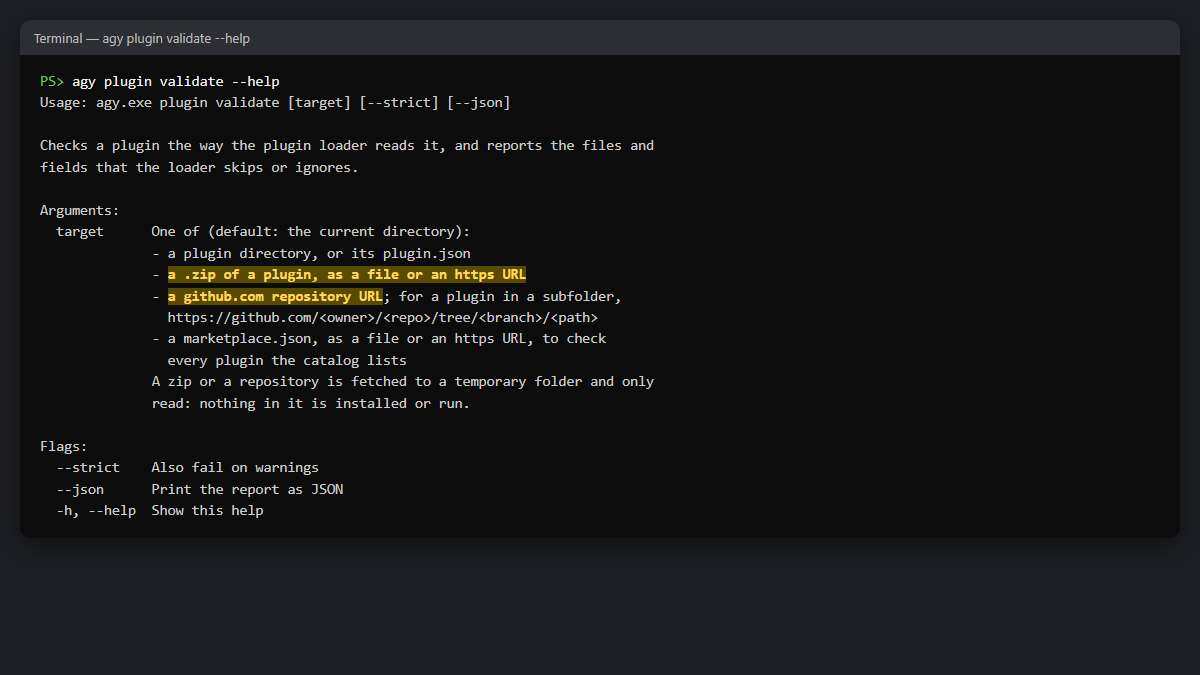
agy plugin validatenow checks.zipfiles,https://links to zip archives, and GitHub repository URLs (including subfolders viahttps://github.com/<owner>/<repo>/tree/<branch>/<path>), and Windowsplugin.jsonfiles saved with a UTF-8 BOM now load properly.
- Vim undo (1.5.11):
unow undoes one command at a time (or a full Insert-mode edit such ascworoback toEsc) and places the cursor at the start of the changed text.
Smaller terminal fixes in 1.5.12
- Full-screen (altscreen) mode shows a scroll-position indicator above the prompt (
↓ 25 lines · 2 turns). - Markdown headings in responses and artifacts render with bold, italic, or underline instead of raw
##markers. - Copying wrapped prompts with the mouse no longer inserts extra line breaks, and CJK bold text next to punctuation renders cleanly.
How to check your Antigravity CLI version and update
Run agy update to update manually (the CLI also auto-updates on launch), and use these read-only commands to inspect your build, release notes, and available models:
agy --version
agy update
agy changelog
agy models
FAQ
What is the latest Antigravity CLI version?
1.5.12, released November 18, 2026. Run agy --version in your terminal to check which build you have installed.
Can I use Gemini 4 Neon with a Gemini API key in Antigravity CLI?
Yes. Starting in Antigravity CLI 1.5.12, GEMINI_API_KEY sign-ins can select Gemini 4 Neon (Low, Medium, High, and XHigh) in /model and --model.
What is run_workflow in Antigravity?
run_workflow (added in 1.5.9 for Google AI Pro and Ultra) is Dynamic Workflows: a tool that lets the agent run Python scripts to orchestrate subagents in parallel or in staged pipelines and aggregate JSON results. See Google's Dynamic Workflows documentation.
How do I open split view in Antigravity Remote Control?
In the Remote Control browser view (from 1.5.12), open a conversation's sidebar menu or its title bar ⋮ menu and select Split Right or Split Down. Split view is available on desktop and tablet screens, not phones.
Why can't Antigravity CLI read my ~/.config or AppData folder?
Version 1.5.10 blocked ~/.config, AppData\Roaming on Windows, and ~/.git-credentials inside the terminal sandbox by default. You can allow specific paths in your sandbox rules; see our Windows sandbox test for details.
Read next
- Gemini 4 Neon Launches Across Antigravity, Gemini App, and API
- Antigravity CLI 1.5.10 Locks AppData in Its Sandbox, but Auto Mode Still Reads It
- Antigravity CLI 1.5.7 Turns On Auto Mode by Default, Even for Headless agy -p
- Antigravity CLI Agent Modes Explained: Default, Accept-edits, Auto and Plan
Sources: agy changelog (1.5.9–1.5.12) and agy plugin validate --help on Antigravity CLI, Antigravity Dynamic Workflows documentation, and our Windows sandbox test, read November 14–19, 2026. How we work: editorial policy.