Antigravity App 2.33.0: Connect Over SSH, GitHub PR Status Pills, Browser Search, and Enterprise /swarm
TL;DR: Released November 17, 2026, Antigravity App 2.33.0 adds Connect over SSH for running projects and agents on remote 64-bit Linux machines, live GitHub pull request status pills, in-page Cmd/Ctrl+F search in the built-in browser, /swarm and UI plugin panels for Business and Enterprise accounts, and 7 new partner plugins—alongside key Windows memory and security fixes.
What's new in Antigravity App 2.33.0?
Antigravity App 2.33.0 ships with 16 improvements and 21 fixes focused on remote Linux development, pull-request visibility, and desktop stability, following 2.32.2 (November 16), which upgraded /btw side questions into persistent multi-turn tabs.
| Version | Release date | Headline changes |
|---|---|---|
| 2.33.0 | Nov 17, 2026 | Connect over SSH (remote Linux hosts), GitHub PR status pills & Overview section, browser Cmd/Ctrl+F, /swarm & UI plugins for Business/Enterprise, 7 new partner plugins, Nord theme |
| 2.32.2 | Nov 16, 2026 | Multi-turn /btw Side Question tabs with read-only workspace tools, diagnostic logging fix |
Connect over SSH: remote Linux projects and agents
Antigravity App 2.33.0 introduces Connect over SSH (documented in Google's new SSH guide), letting you open a remote 64-bit Linux machine in its own App window using your existing ~/.ssh/config. Antigravity installs its remote server automatically over OpenSSH (~/.antigravity-hub-server/ and ~/.gemini/), so projects, Git worktrees, agents, and terminals run directly on the host and, per Google's documentation, keep running even after you close the window or put your laptop to sleep.
Requirements
| Component | Requirement |
|---|---|
| Local machine | Antigravity App v2.33.0+ (macOS, Windows, or Linux) and OpenSSH (ssh / ssh.exe in PATH, or ANTIGRAVITY_SSH_BIN) |
| Remote OS & arch | 64-bit Linux (x86_64 or arm64) with glibc 2.26+ (e.g. Ubuntu 18.04+, Debian 10+, RHEL 8+). macOS, Windows, and musl/Alpine are not supported. |
| SSH config | AllowTcpForwarding yes (or local) in sshd_config on the target and any ProxyJump host |
| Network & auth | Outbound HTTPS access; works with personal Google Accounts, Google Workspace, Pay As You Go, and Gemini Enterprise |
How to connect Antigravity to an SSH host
- Ensure your host meets the requirements above and is listed in
~/.ssh/config(Antigravity uses your OpenSSH keys,ssh-agent, andProxyJumpsettings automatically; on Windows, load your key intossh-agentand runssh <host>once in a terminal to recordknown_hosts). - Open the SSH dialog in the Antigravity App via Create New Project → SSH Host… (sidebar), Select Project → SSH Host, the command palette (Connect to SSH Host…), or launch the App with
--ssh-host=<destination>. - Pick a host from Recent or SSH Config (or enter
[user@]host[:port]) and click Connect. - Complete the browser OAuth sign-in when the
(SSH: <host>)window opens. Closing the window later disconnects SSH while leaving remote agents running; use Stop SSH Server… to shut down the remote server.
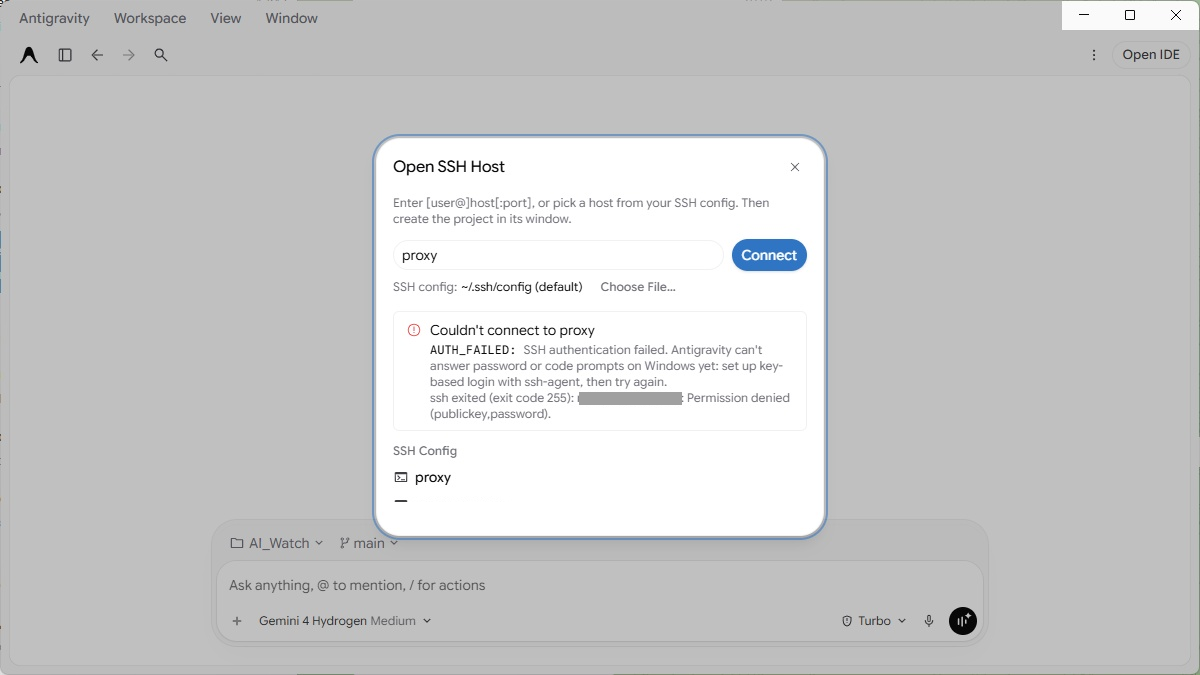
On our Windows 11 test with Antigravity App 2.33.0, the Open SSH Host dialog read ~/.ssh/config immediately, but attempting to connect with a passphrase-protected key not loaded into ssh-agent failed right away without prompting: AUTH_FAILED: SSH authentication failed. Antigravity can't answer password or code prompts on Windows yet: set up key-based login with ssh-agent, then try again.
| Remote option | Where agents run | Client | Host setup |
|---|---|---|---|
| Connect over SSH | Your remote Linux machine | Antigravity App | Automatic over OpenSSH |
| Remote Control | Your own desktop or server | Web browser | App or CLI signed in |
| Remote Agents (Pro / Ultra) | Google-managed environment | App, CLI, or browser | None |
GitHub pull request status pills and Overview section
GitHub pull request links in chat messages and URL artifact cards now render as live status pills with hover cards in 2.33.0, paired with a new Pull Requests section in the Overview panel and an optional conversation sidebar indicator.
/btw Side Question tabs (2.32.2–2.33.0)
Starting in 2.32.2, side questions (/btw) open in a dedicated Side Question tab in the side panel where you can ask multi-turn follow-ups and let the agent read files, search your workspace, and run read-only commands without interrupting the main conversation. Version 2.33.0 adds an Insert into main conversation action for finished answers, lets you start /btw from selected subagent text, and lets you promote a subagent tab to Full View while running /btw.
Built-in browser Cmd/Ctrl+F search
You can now search within pages in the built-in browser (2.33.0) using Cmd/Ctrl+F from either the browser toolbar or the page itself, while web apps with their own search keep handling the shortcut. Browser-agent approval prompts also no longer time out after 60 seconds while you are away.
Enterprise /swarm, 7 new partner plugins, and media upgrades
- Business & Enterprise
/swarmand UI plugins (2.33.0): Business and enterprise accounts can now run/swarmand open UI plugin panels from the side panel, Overview, New Tab, and title bar when permitted by organization admin settings. - Marketplace additions (2.33.0): Google added Cloudflare, Grafana Cloud, SonarQube, incident.io, Better Stack, Tavily, and Levels.fyi to the partner plugin marketplace, alongside updates to the Gemini API plugin and 15 partner plugins.
- Themes, R syntax, media, and PDFs (2.33.0):
- Nord dark theme and matching syntax palette in Settings → Appearance.
- Syntax highlighting for R and R Markdown (
.R,.Rmd,.Rprofile,.Renviron,NAMESPACE). - Side-panel playback for audio and video files up to 200 MB (up from 20 MB), plus
.amrvoice attachments in Gemini conversations. - Faster scrolling on dense PDFs via deferred text-layer rendering (with a toolbar toggle for text selection).
- Admin device policies (2.33.0):
admin_settings.jsoncan now lock sign-in and project settings, enforce permission ceilings, disable remote control, and restrict plugins or marketplace access.
Key fixes on Windows, macOS, and MCP (update recommended)
Among the 21 fixes in 2.33.0, several address security issues and major desktop pain points:
- Security fixes:
- Stopped the desktop app from opening a local debug port on startup.
- Closed hook and wildcard-rule bypasses around enforced command or outside-project file review.
- Stopped configured MCP headers from being sent across cross-origin redirects.
- Windows fixes:
- Timed-out Git status checks no longer leave background
git.exeprocesses consuming gigabytes of memory. - Custom agent, rule, and
hooks.jsonfiles saved with a UTF-8 BOM are no longer ignored; quoted command-hook paths work; and multi-line scheduled automation prompts are no longer truncated to the first line. Ctrl+Don Windows and Linux now cancels an active turn or prompt instead of splitting the pane.- MCP, OAuth, and reliability:
- Remote OAuth MCP servers no longer sign out after an hour on token refresh, and OAuth callbacks now work on IPv6-only machines.
- Long reasoning turns no longer time out after 5 minutes of thinking, and temporary network failures or offline launches keep your saved session instead of signing you out.
How to update to Antigravity App 2.33.0
Open the Antigravity menu in the top-left corner and click Check for Updates, or download v2.33.0 directly from antigravity.google/download/. If you also use the terminal client, check our latest Antigravity CLI release notes.
FAQ
Can Antigravity connect over SSH to macOS or Windows hosts?
No. Antigravity's Connect over SSH requires a 64-bit Linux remote host (x86_64 or arm64) with glibc 2.26+. macOS, Windows, and musl-based Linux distributions such as Alpine are not supported.
What's the difference between Connect over SSH, Remote Control, and Remote Agents?
Connect over SSH runs projects and agents directly on your own remote Linux machine from the Antigravity App; Remote Control lets a web browser control an App or CLI session running on your desktop; and Remote Agents (Pro and Ultra) run inside a Google-managed cloud environment.
What do I need on the server for Antigravity SSH?
You need 64-bit Linux with glibc 2.26+, AllowTcpForwarding yes (or local) in sshd_config, outbound HTTPS access, and a writable, executable $HOME directory (~/.antigravity-hub-server/ and ~/.gemini/).
How do I update to Antigravity App 2.33.0?
In the Antigravity App, open Antigravity → Check for Updates, or download the v2.33.0 installer from antigravity.google/download/.
Read next
- Antigravity CLI 1.5.9–1.5.12: Split View, Dynamic Workflows, Faster Auto Mode and Gemini 4 Neon API Keys
- Gemini 4 Neon Launches Across Antigravity, Gemini App, and API
- Google Antigravity Turns One: The First Year in One Timeline
Sources: Antigravity changelog (v2.32.2 and v2.33.0), Connect over SSH documentation, and our Windows 11 test of Open SSH Host on Antigravity App 2.33.0, read and tested November 18–19, 2026. In the SSH dialog screenshot we covered the internal user/IP address and hid a second host entry. How we work: editorial policy.