Google AI Studio Monthly API Credits: $10 on Pro and $40–$100 on Ultra
TL;DR: On November 21, 2026, Google updated its Google AI plans documentation with a built-in flow inside Google AI Studio to claim monthly Google Cloud credits for the Gemini API: $10/month on Google AI Pro, $40/month on Google AI Ultra 5x, and $100/month on Google AI Ultra 20x. Unlike AI Studio's daily web quota, these credits work with paid Gemini API keys in Playground, Build mode, and external apps—but only on the primary subscriber's account (Family members and Google AI Plus are excluded), and Prepay billing accounts require a minimum $5 paid balance before promotional credits activate.
Monthly API credits by plan
| Plan | AI Studio daily web quota | Monthly Google Cloud API credits | Who is eligible |
|---|---|---|---|
| Free | Modest quota (4 Hydrogen) | None | Not eligible |
| Google AI Plus | — | None | Excluded |
| Google AI Pro | Higher quota (4 Neon) | $10/month | Primary subscriber only (no Family members) |
| Google AI Ultra (5x) | Highest quota (4 Carbon, 4 Neon) | $40/month | Primary subscriber only (no Family members) |
| Google AI Ultra (20x) | Highest quota (4 Carbon, 4 Neon) | $100/month | Primary subscriber only (no Family members) |
Each monthly grant lasts 12 months and applies to paid Gemini API keys in AI Studio (Playground and Build mode), external applications, and other Google Cloud services—including agents like Deep Research or Antigravity Preview that require API billing.
Why you might not see the "Claim free API credits" card
In our own check on November 22, 2026, a Google AI Pro Family member account did not show any credit offer in Google AI Studio. Signing in with the primary subscriber's @gmail.com account immediately showed the Claim free API credits card ("$10 monthly from the Google Developer Program") in the bottom-left sidebar.
Per Google's documentation, three conditions apply:
- Your Google AI Pro or Ultra plan must be active on the primary subscriber account (Family plan members and Google AI Plus plans are not eligible).
- You must sign in to Google AI Studio with that same
@gmail.comaccount. - Credits can only be applied to a single Cloud Billing account.
How to claim and link the credits in AI Studio
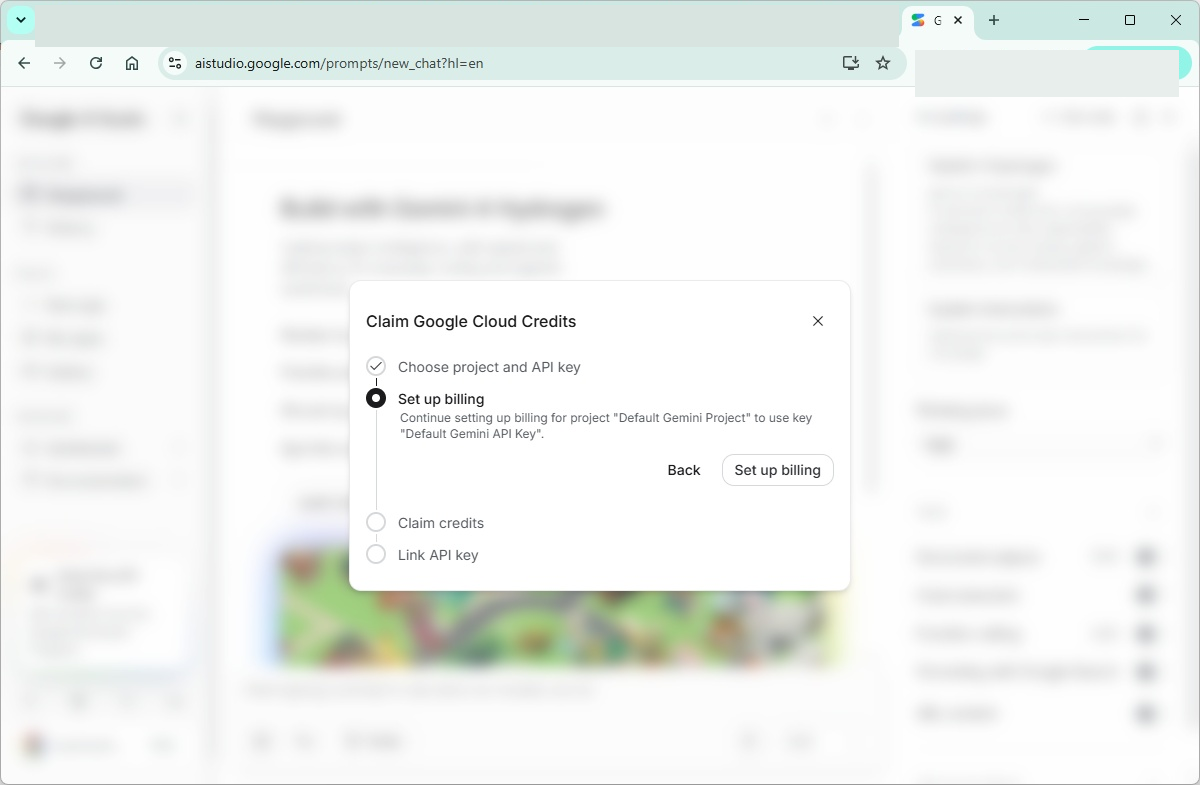
With the November 21 guided dialog in AI Studio, you can claim the credits directly instead of going through your Google Developer Program profile separately:
- In Google AI Studio, click Claim free API credits in the left menu (if you are setting up a developer profile and billing for the first time) or the Redeem credits card (if you already have them).
- Choose an existing Google Cloud project and API key, or keep the auto-created Default Gemini Project and Default Gemini API Key.
- Click Set up billing to link or create a Cloud Billing account.
- Review the Google Developer Program Terms of Service and click Redeem and Continue (or Redeem / Redeem all). Keep Auto-apply future Google Developer Program credits to this billing account checked so future monthly grants apply automatically without manual claiming.
- Click Select key to link your paid API key in AI Studio (in Playground, a key icon in the prompt box confirms your paid key is active; in Build mode, set
GEMINI_API_KEYunder Secrets).
The $5 Prepay catch and spend controls
If you set up a new Prepay Cloud Billing account (rather than Postpay), Google's Google AI plans and billing documentation note an important requirement:
- You need a paid balance greater than $0 (minimum $5 top-up) to activate promotional Google Cloud credits on Prepay.
- Google draws from your eligible promotional credits before touching your $5 paid balance.
- If your paid balance hits $0, promotional credits pause until you add funds again.
To avoid overspending beyond your monthly $10, $40, or $100 grant:
- Check credit balances: AI Studio Billing or your Google Developer Program profile.
- Track usage: AI Studio Usage and Projects.
- Set a budget cap: AI Studio Spend lets you set a monthly project spend cap that stops paid API requests once reached.
Don't confuse these three credit/quota systems
Google now has three separate allowances with similar names:
- AI Studio daily web quota: Included on Free, Pro, and Ultra, resets daily, and applies only inside AI Studio's web UI when no paid API key is linked (see our Google AI plans model matrix).
- Monthly Google Cloud API credits ($10 / $40 / $100): Claimed via Google Developer Program, apply to paid Gemini API keys (both in AI Studio and external apps), and use standard Gemini API pricing tiers (Standard, Batch, Flex, Priority) and usage tiers (Free, Tier 1–3).
- Google One AI credits: A separate consumer credit system (used for Antigravity overages, per Antigravity pricing, or Gemini consumer features). They do not work in AI Studio and do not overlap with Google Cloud credits.
What this means for you
- Primary Google AI Pro or Ultra subscriber: If you haven't claimed your monthly credits yet, check the bottom-left sidebar in Google AI Studio—especially if you want to run
Gemini 4 Carbonin AI Studio on Pro (which our plans guide notes requires a paid API key or Ultra) or call Gemini APIs from external tools without paying out of pocket beyond keeping a $5 Prepay balance. - Family plan member or Google AI Plus user: You will not see the
Claim free API creditscard; only the primary Pro/Ultra subscriber can claim and link them to one Cloud Billing account.
Sources: Google AI Studio: Google AI plans, Gemini API billing, Antigravity pricing, and our own check on Google AI Pro primary and Family accounts.