Antigravity for Visual Studio, Taken Apart: It Runs agy, and Its Telemetry Code Now Has an Email Field
TL;DR
- Google's Antigravity extension for Visual Studio (the full IDE, not VS Code) contains no agent. It downloads the Antigravity CLI (
agy.exe), starts it as a local server on 127.0.0.1 and shows that server's web interface inside Visual Studio. It has worked this way since the first build in August. - We read all 11 builds the Marketplace CDN still serves, from 1.0.260818.0 (August 18) to 1.0.261102.0 (November 2). We read them as bytes only and never installed or ran them.
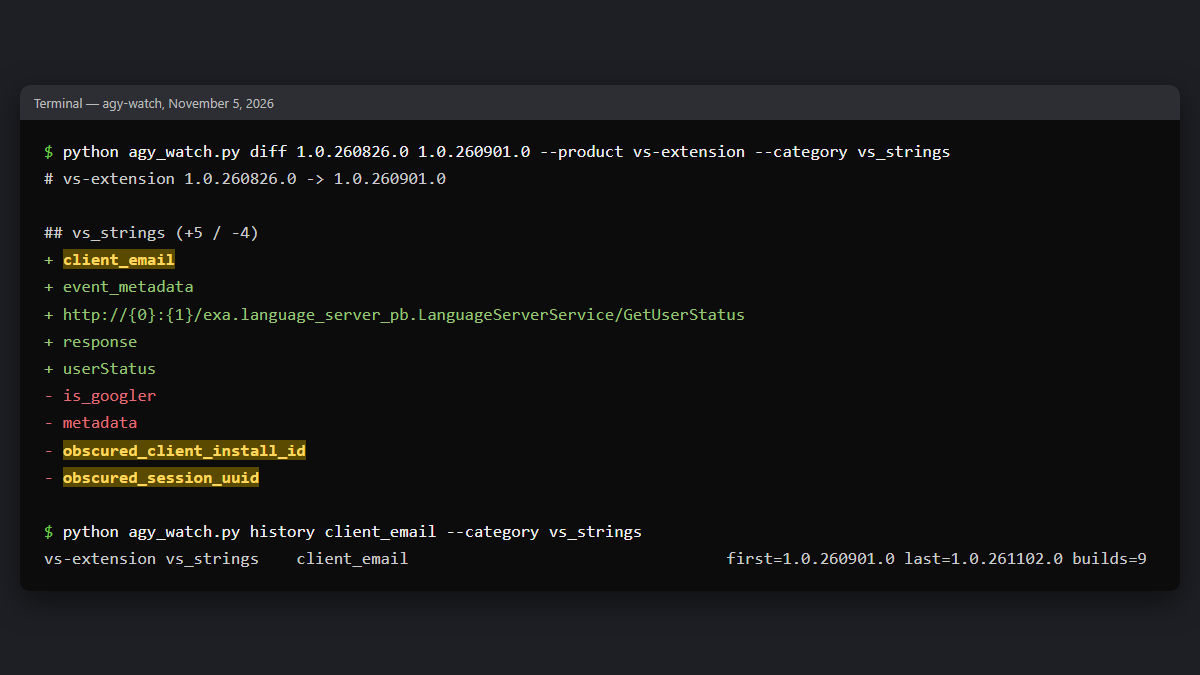
- In 1.0.260901.0 (September 3) the telemetry code changed: the fields
obscured_client_install_idandobscured_session_uuidwere removed, and aclient_emailfield was added. The email comes from the local server's account status. The release notes for that build only mention Marketplace categories and search tags. We read this in the code; we did not capture traffic. - In 1.0.261026.0 (October 26) the extension learned to read the Visual Studio terminal and Output window. You have to start it: you select text and use Shift+Right-Click, or you mention
@terminalin chat. - You can turn usage telemetry off in Antigravity Settings > Account > Enable Telemetry. If you had already turned it off in Tools > Options > Antigravity > General, that setting still counts.
How we looked at it: 11 VSIX builds, read as bytes
A Visual Studio extension is a VSIX file, which is a zip archive. The Marketplace API only lists the newest version. But the Marketplace CDN still serves older VSIX files when you ask for a version number. We took the version numbers from Google's Antigravity changelog, which lists 12 releases. Eleven downloaded. 1.0.260928.0 returns 404; our guess is that it was withdrawn.
Each VSIX holds one assembly with the extension's own code, Antigravity.VisualStudio.dll, plus Microsoft's WebView2 libraries. We pulled the text strings out of that assembly for every build and compared consecutive builds with our own monitoring scripts (agy-watch). Strings show what the code contains: field names, messages, command lines. They do not show what is actually sent over the network. We did not capture any traffic. Where we interpret the strings, we say so.
What the Antigravity Visual Studio extension actually is: a host for agy
The VSIX is about 650 KB, and the extension's own code is 446 KB of that. It has no AI agent and no language server inside. The strings, unchanged since the first build, describe a small host:
- The extension downloads the CLI itself. It fetches
agy.exefrom the same release server that the standalone Antigravity CLI updates from. It verifies a checksum, keeps a backup of the previous binary and can runagy install. The release notes for 1.0.260818.0 call this "automatic CLI management". You can point it at your own binary with the environment variableAGY_VS_CLI_PATH. - The extension starts
agyas a local server. The command line is--app_data_dir=antigravity --hub --hub-port=<port> --csrf_token=<token> --log-file=…vs_ls.log, on a random port on 127.0.0.1. The CSRF token was added in 1.0.260826.0; the first build started the server without one. The--hub-portflag exists in the CLI too:agy1.5.1 prints "Retry with a different port: --hub-port" when the port is taken. - The extension shows that server's web interface. The chat window is a WebView2 control loading the local server's page with
extensionView=true&extensionVariant=visual-studio. Visual Studio and the page talk over message calls such asAcceptStep,RejectStep,AddContext,InterruptAgentandSetFileDiffs.
So the agent you talk to in Visual Studio is the same agy you get with the Antigravity CLI, the same backend that Antigravity IDE 2.6.0 now runs. Models, credits and limits come from your Antigravity account, as Google's extension docs say. The telemetry event names are jetski_web.chat_message_sent and jetski_web.conversation_started, the same Jetski code base as the Antigravity app. The request header x-codeium-csrf-token is left over from Codeium.
Antigravity for Visual Studio changelog: 11 builds, August to November 2026
| Build | Released | VSIX | What changed (code strings and release notes) |
|---|---|---|---|
| 1.0.260818.0 | Aug 18 | 792 KB | First release. Already downloads and starts agy. No telemetry module yet |
| 1.0.260826.0 | Aug 27 | 808 KB | Telemetry to Google Firebase logging ("Google Concord", CLOUDCODE_VISUALSTUDIO); events for messages sent and conversations started; CSRF token for the local server |
| 1.0.260901.0 | Sep 3 | 809 KB | client_email added to telemetry; obscured install and session IDs removed |
| 1.0.260907.0 | Sep 10 | 809 KB | Reliability fixes |
| 1.0.260914.2 | Sep 17 | 586 KB | The drop is a 2.2 MB ThirdPartyNotices.txt removed, not code. The active and other open documents are sent to the agent as editor state. A test mode (AGY_E2E_TEST_MODE) with a browser debugging port |
| 1.0.260921.0 | Sep 21 | 586 KB | Focus and tab fixes |
| 1.0.260928.0 | Sep 29 | — | In the changelog, but the CDN returns 404 |
| 1.0.261005.0 | Oct 5 | 590 KB | Feedback reports attach Visual Studio details and local server logs (per the release notes) |
| 1.0.261012.0 | Oct 12 | 596 KB | Inline diff switch (AGY_ENABLE_INLINE_DIFF) |
| 1.0.261016.0 | Oct 16 | 601 KB | Chat streams moved to one WebSocket |
| 1.0.261026.0 | Oct 26 | 635 KB | Terminal and Output window context, Send to Terminal, unified telemetry setting |
| 1.0.261102.0 | Nov 2 | 651 KB | Inline diffs on by default |
Dates are from the changelog. VSIX sizes are from the files we downloaded.
Telemetry in 1.0.260901.0: client_email replaces the obscured IDs
From 1.0.260826.0 on, the extension can post usage events to firebaselogging-pa.googleapis.com. The log messages call the destination "Google Concord". The code that builds an event lists these field names in order:
- extension name and version,
editor_name("Visual Studio"),editor_version; - OS platform, OS release, architecture;
console_type(CLOUDCODE_VISUALSTUDIO);- event name and event metadata;
- then the client fields.
In 1.0.260826.0 the client fields were is_googler, obscured_client_install_id and obscured_session_uuid. In 1.0.260901.0 they are client_email and client_install_id. Right before them, the new code calls the local server's GetUserStatus method and reads userStatus → email. Our reading is that from this build on, usage events are tied to your Google account email rather than to an obscured install ID. We have not seen a real event on the wire, so treat this as what the code is built to do, not a measurement.
The release notes for 1.0.260901.0 say: "Updated Visual Studio Marketplace extension categories and search tags" plus "internal reliability updates". The telemetry change is not mentioned.
Two more things in the same code:
- Wipeout requests. There are messages about sending a "wipeout request" to Google Concord with the install ID. Wipeout is Google's term for deleting user data. We could not tell from the strings what triggers it. Turning telemetry off is a likely candidate, but that is a guess.
- The opt-out moved. Since 1.0.261026.0 the extension says: "Antigravity telemetry is now controlled from Antigravity Settings > Account. Your legacy 'Enable Telemetry': false setting still keeps extension usage metrics off." The release notes say the same.
None of this covers your prompts or code. Those go to the agent (agy) and are governed by your Antigravity plan's terms. Google's extension docs promise that for enterprise accounts "your code, prompts, and agent transcripts are never used to train Google foundation models".
Terminal and Output window access
1.0.261026.0 added three things, all described in Google's release notes:
- @terminal in chat attaches "up to 8 KB of recent terminal output" from an open Visual Studio terminal or Output pane.
- Add Terminal Selection to Chat in the terminal's Shift+Right-Click menu, and an Output window menu item. With nothing selected in the Output window, the menu item falls back to "the trailing 8 KB".
- Send to Terminal pastes a command from the chat at the terminal prompt "without auto-executing", and asks for confirmation for multi-line text.
The strings add some detail on how this works:
- A mouse hook. The Shift+Right-Click menu relies on a Windows mouse hook (
SetWindowsHookEx, "Mouse hook installed. Shift+Right-Click in the terminal shows the Antigravity menu."). From the strings we can't tell whether the hook is limited to Visual Studio's own threads or covers the whole system. - A clipboard fallback. When the terminal "exposes no GetSelectedText()", the code falls back to Visual Studio's
Edit.Copy, in a method namedTryGetTextViaClipboardBounce. The release notes say selections are read "without overwriting the system clipboard". The code reads and writes the clipboard data object (GetDataObject,SetDataObject), which fits copying and then restoring what was there before. We have not tested it.
In every path we found, you start the read: a selection plus a menu click, or an explicit @terminal mention. Still, it is worth knowing that up to 8 KB of build or test output, including any paths, tokens or connection strings printed there, goes to the agent when you do.
WebView2 runs with certificate checks off
Every build starts its WebView2 control with --no-proxy-server --ignore-certificate-errors --allow-insecure-localhost. The page it loads comes from agy on 127.0.0.1 over plain HTTP. Our guess is that the flags are there so a local self-signed or plain-HTTP setup never breaks the chat window. As far as we can see, the control only shows that local page. Links open in your normal browser; 1.0.260914.2 fixed that for links in Settings. Still, if that WebView ever loads remote content, certificate errors will not stop it. The browser debugging port 9222 only shows up with the test-mode variable AGY_E2E_TEST_MODE.
Visual Studio 2022 or 2026? The docs and the package disagree
Google's Visual Studio page asks for "Visual Studio 2026 (version 17.8 or later)". The package manifest asks for version 17.14 or later of any edition, which includes Visual Studio 2022 17.14, and x64 only (amd64). So on an Arm64 Windows PC it should not install, even though the VSIX ships Arm64 WebView2 loaders; we have not tried.
On November 5, 2026 the Marketplace listed 28,656 installs and a 3.37 rating from 27 reviews, with the publisher Google verified. The Marketplace only shows current numbers, so we now record them hourly.
How to turn off telemetry and what to check before using @terminal
- If you just want the agent in Visual Studio, the extension is effectively the Antigravity CLI with a native diff view. Your models, credits and limits are the same as in
agy. - To turn usage telemetry off: Antigravity Settings > Account > Enable Telemetry. An older Tools > Options > Antigravity > General > Enable Telemetry = False still applies.
- Before using @terminal or Output context, check what the last 8 KB of that pane contains.
- On a managed PC, note that the extension downloads and updates
agy.exeon its own. Admins can pin the binary withAGY_VS_CLI_PATH.
Read next
- Antigravity IDE 2.6.0 dropped its own language server: the IDE's own switch to agy --hub
- Antigravity is building a native swarm mode: more of what ships inside the agy CLI this extension runs
- Antigravity 2.29 Voice mode: what we got was dictation: another Antigravity feature we checked against the docs
Sources: Antigravity for Visual Studio VSIX builds 1.0.260818.0–1.0.261102.0 from the Visual Studio Marketplace CDN, read as bytes (agy-watch vs-backfill, diff, history); Antigravity changelog, Visual Studio tab; Antigravity IDE extensions docs; Visual Studio extension docs; Visual Studio Marketplace listing, November 5, 2026. How we work: editorial policy.